Battlefield 2042
In Collection, give owned and inspected creatures a shared order for public values. Keep labels visible when a value is unavailable.
Borrow the principle, adapt the mechanism, or keep the case as reference?
Trace the readout, its owner, the state and the interaction. Compare the same version or label the difference. A game capture, a patch illustration and an engineering slide answer different questions.
Study how four Remnant columns line up the same attributes. Name the comparison you want to make in your own playthrough.
In Collection, give owned and inspected creatures a shared order for public values. Keep labels visible when a value is unavailable.
For a selected format row, capture focus, actual selected value, affected rules and Back behavior separately. Read each through keyboard and controller paths.
Prototype the active owner, selected target and public health separately in the battle HUD. Use a readback where the selected creature belongs to the other side.
Compare what the player can infer. The scale labels describe the production context of each example.
These editorial top tens compare eleven documented productions from 1990–2023, including later revisions. Each ordering weighs the stated problem, the visible mechanism or the applicability of the lesson according to the selected view. The three Snake Eyes picks can differ from the first three historical ranks. The pool favors traceable public sources with images. It underrepresents unpublished failures, older console documentation and games without English material. Award scope is reported separately, and the AA label describes an estimated production scale. A still records a visible state. A designer’s account records a reason. Neither measures how a Snake Eyes player will perform.
Each entry links to the image and the feature evidence. Award badges name the recognized category. The saved direction records the director’s own choices.
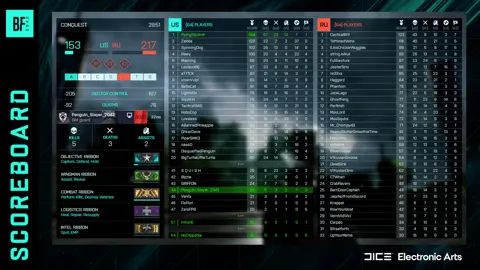 Multiplayer first-person shooterBattlefield 2042Trace the same field across the two teams
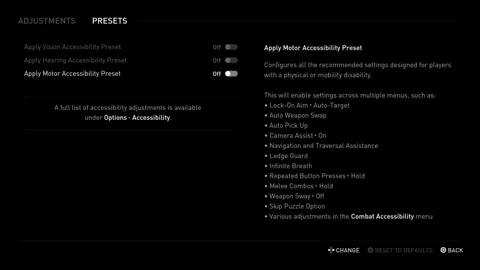 Action adventureThe Last of Us Part IISeparate focus, current value, consequences and edit path
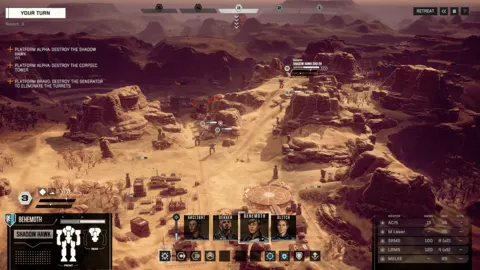 Turn-based mech tacticsBATTLETECHLink the phase strip to the selected unit and its local detail
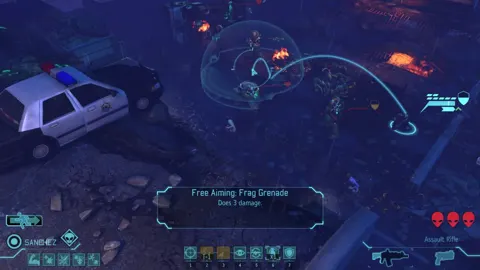 Turn-based tactical strategyXCOM: Enemy UnknownTrace a preview to its spatial target
 Musical path puzzleRytmosConnect a visible route to the documented sound rule
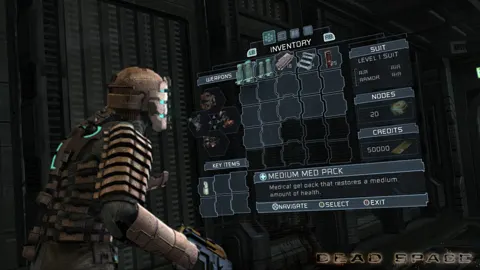 Survival horrorDead SpaceFind the spatial home for each type of information
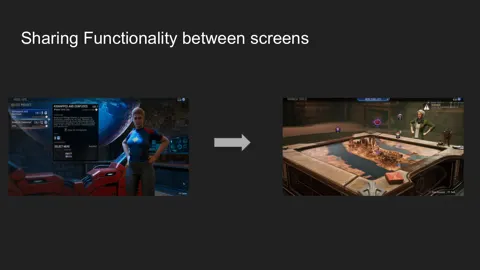 Superhero tactical RPGMarvel’s Midnight SunsInspect an engineering example at its own level
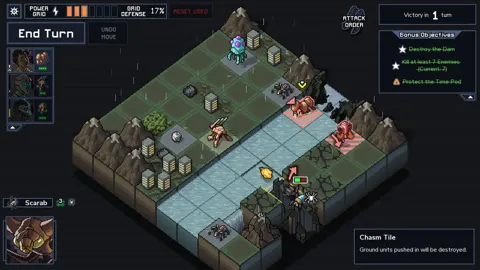 Grid tactics puzzleInto the BreachPlace an exact rule beside its current subject
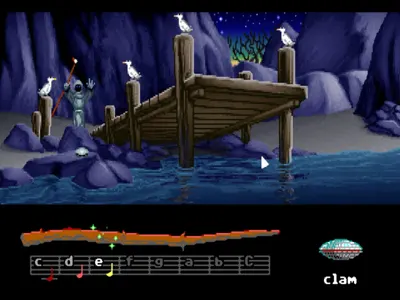 Musical graphic adventureLoomFollow a command from selected subject to musical input
 Historical narrative adventurePentimentLocate the exception rather than assuming one look is mandatory
Trace the same field across the two teams
Find the cyan and red team headings, then the matching icon columns beneath each. The left block keeps the local player’s three personal stats apart from the team tables.
Separate focus, current value, consequences and edit path
The highlighted Motor row still reads Off. Its detail pane names the cross-menu effects, and the separate Options › Accessibility instruction lets a reader find adjustments.
Link the phase strip to the selected unit and its local detail
At the top phase 3 is highlighted. The same number appears beside units. At the bottom Behemoth’s selected portrait, named mech and front/rear diagrams identify which unit is described. The weapon list occupies another region.
Trace a preview to its spatial target
A line from the selected grenade action ends inside a translucent blast sphere. The HUD states that this is a free-aim frag grenade, giving the geometry a named scope.
Connect a visible route to the documented sound rule
A yellow circuit runs around two raised cylinders and a red disc. The interview explains that contacts with emitters generate sounds. The path is inspectable even when the audio is unavailable.
Find the spatial home for each type of information
The character stands left of a projected Inventory panel. The item grid and the selected Med Pack description stay on that panel while a separate illuminated gauge remains on the suit.
Inspect an engineering example at its own level
Gonzales’s slide 125 connects two different menu presentations with an arrow. Earlier slides explain that controls can use shared screen components. This is evidence about how the team organized UI functionality.
Place an exact rule beside its current subject
The terrain panel identifies the chasm and the consequence for a pushed ground unit. The map still shows the position and threatened tiles, while objectives remain in a separate panel.
Follow a command from selected subject to musical input
The target name reads clam while the distaff remains below the scene. Lettered and colored notes occupy a separate line so the player can relate the current object to an available input vocabulary.
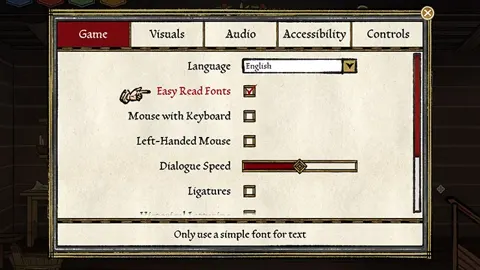
Locate the exception rather than assuming one look is mandatory
The settings image places Easy Read Fonts next to its checked value and describes the simpler rendering. Ligatures and Dialogue Speed are separate rows.
Loading saved references…