Dead Cells
Record your input setup. If you understand what Inspect means but it takes effort to trigger, check the operation on your own device.
Review from memory, play through once, or play and reflect on one moment?
Studio practice · about 32–48 minutes for this studio exercise
Record one expectation, one observable action and one feeling from a solo attempt.
Choose one task, such as finding training hints. Before you move, say which row you expect to use.
After the attempt, record the row you first tried, what appeared, and how that moment felt. A detour is evidence too.
Repeat only if you can name the starting screen, input device and prior knowledge. Mark a familiar second pass as a repeat.
R32 Final installed walkthrough photograph, 2 November 2026. Animated teaching diagrams are illustrative. Camera moves over still photographs are editorial magnification. Original study narration, synthesized locally.Use your own real play to separate a visible action, its reason and the feeling it produced.
Select one task you actually want to do, such as finding sound settings or reviewing a portrait. Record your build or dated frame, usual input, prior practice and starting place.
Take one uninterrupted pass on your own device. Record the first action and one hesitation. If you have only the images, record a prediction and mark the runtime outcome untested.
Keep a dated capture or note from this step.Use the receipt or your recording to revisit the hesitation. Describe your action, two explanations that fit, and your feeling separately. A pause spent enjoying a portrait deserves its own account.
Read the genuine-use discussion in Neustaedter and Sengers. Identify the personal circumstance that makes your session informative and the question about newcomers that it cannot answer. Put the latter in Part 2.
Stop when · Stop with one observed moment, one competing account and one neutral question you could answer by replaying it.
Choose a second context · 16 more min
Read the Somyeol field case in Book One. Repeat once only if changing the device or interruption would distinguish your explanations.
The team describes two signals while a red car follows the circuit. Listen for where to steer and for the warning that the car is nearing the track edge. Those cues answer different questions.
The edge alert warns of proximity. It does not certify an off-track event. This excerpt illustrates the developers’ method and cannot establish that these sounds suit a different player or game.Xbox / Turn 10 Studios · Forza Motorsport, Blind Driving Assists · full source ↗Start on the green board, then watch the snow board. Colored squares occupy specific cells. In a closer view an orange strip crosses a green cell. Pause there and identify the area you would inspect before committing.
The trailer cuts between different boards. A blast on a later board cannot verify the result of the earlier forecast. No narration is needed to compare the on-screen highlights.Nintendo of America · Into the Breach by Subset Games · full source ↗Follow the cut from the snowy exterior to Mike’s Character Info, then to the evidence tabs. Which information tells a returning player who they are following?
The source title calls this a pause menu. Its first visible panel is Character Info. The physical control, precise simulation state and focus on return are outside this excerpt.Game Dev References · original PS4 gameplay, Supermassive Games / Sony Computer Entertainment · full source ↗Watch the General options, a speaking character in the scene and the return to Accessibility settings. Dale describes subtitle size, names, background opacity and an alternate font, then discusses transcripts for interactions.
This is Dale’s edited review of the 2024 PS5 version. Her font preference is personal. The cuts do not demonstrate an uninterrupted settings-to-gameplay test or the 2015 PS4 controls.Laura Kate Dale · Access-Ability, Until Dawn PS5 Accessibility Review · full source ↗Read this study in the textbook ↗ · Compare the visual references →
Open the course screening room →Take one route through the estate or arena on your usual controls. Predict the next visible change, play it through, then write where your attention went and how the moment felt.
A small diamond sits beside Campaign. Battle and the other destinations sit in a quiet column beside the lit serpent. The frame records the marker’s position; its input cause is unverified.
Record your input setup. If you understand what Inspect means but it takes effort to trigger, check the operation on your own device.
For a failed Back or Inspect, trace your intended action, the input the game received, the focused item and the resulting screen.
If the estate feels slow, separate finding the name, reading it, making your choice and operating it.
Compare what the player can infer. The scale labels describe the production context of each example.
These editorial lists rank how well a particular shipped interface supports the stated research question. We inspected publisher and developer imagery across 22 candidate games, including examples from the 1990 Loom lineage through 2023 releases. We compared the specificity of the task, the strength of the primary source, whether an observable action can distinguish plausible explanations, and transfer across genres. The four lists answer different questions. The three Snake Eyes picks in each list are separate editorial recommendations. In particular, the Dead Cells team reports a player panel for its revision, and Turn 10 describes direct consultation on Blind Driving Assists. Other proposed prompts and observations are our exercises. No reference screenshot records a Snake Eyes participant, and no sample here represents all game players. Award labels describe their organizer’s category rather than endorsing our rank or exercise. In Workbook Part 1, use each observation prompt on your own attempt. Historical studies describe their own participants. Save comparisons requiring other players for Workbook Part 2.
Each entry links to the image and the feature evidence. Award badges name the recognized category. The saved direction records the director’s own choices.
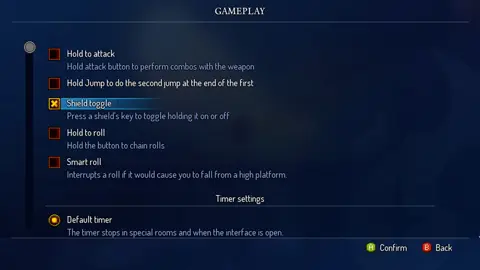 Action platformerDead CellsPlayer-panel feedback plus a task
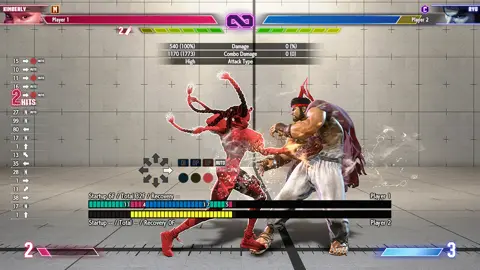 Fighting gameStreet Fighter 6Input trace and repeatable replay
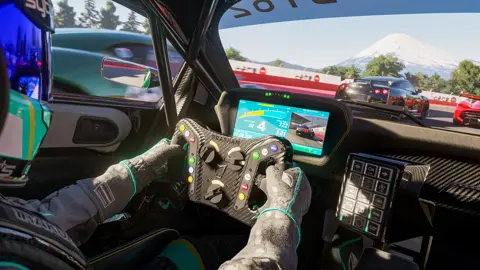 Racing simulationForza MotorsportInterview and observe in the person’s setup
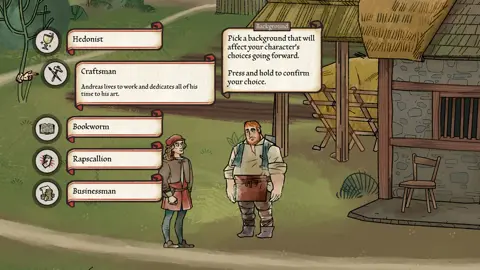 Historical narrative RPGPentimentCompare a visual and an operational intervention
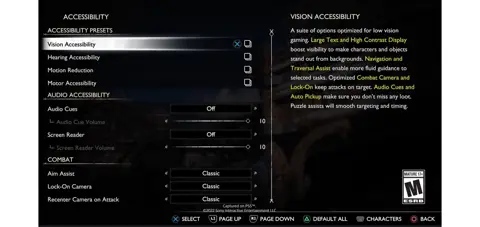 Action adventureGod of War RagnarökConfiguration and equivalent tasks
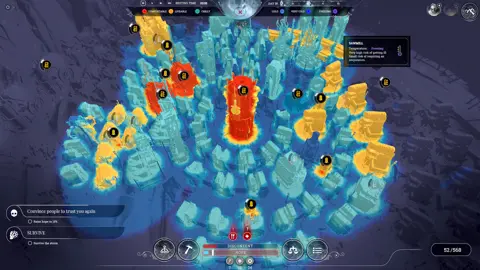 Survival city builderFrostpunkFirst visit versus resumption
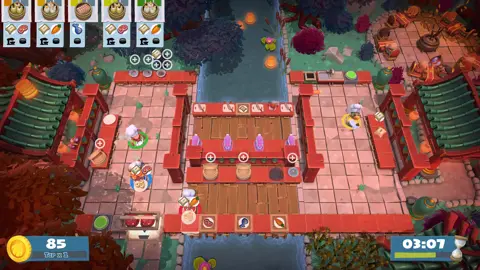 Co-operative cookingOvercooked! 2Shared workspace versus separate participants
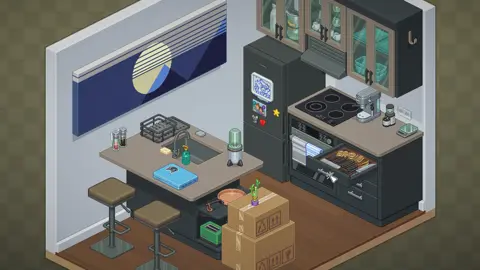 Environmental placement puzzleUnpackingPlacement work and personal judgment
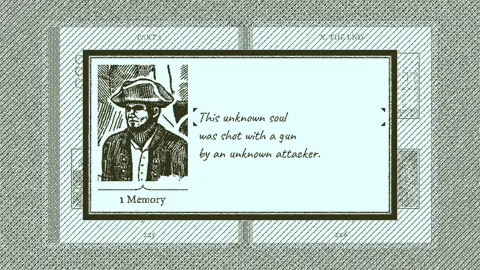 Deduction adventureReturn of the Obra DinnEvidence search versus data entry
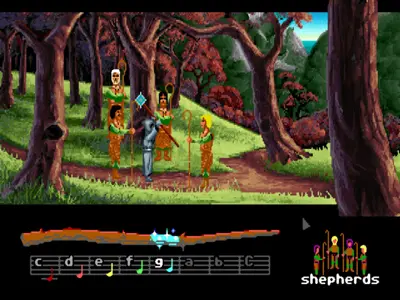 Musical graphic adventureLoomHistorical input and sensory context
Player-panel feedback plus a task
The developers describe working with an AbleGamers panel and the Steam community. This update screenshot shows a shield option that changes holding into a toggle. A person can understand the purpose of a shield and still find the original gesture costly.
Input trace and repeatable replay
The training HUD shows the received directions and buttons, the attack data and the frame display. The recording menu separately allows a fixed dummy action to be replayed. An observer can compare intent, input delivery and game response.
Interview and observe in the person’s setup
A cockpit frame provides road, traffic, speed and gear visually. Turn 10 separately documents co-development of adjustable audio cues with blind consultant Brandon Cole and other players. A sighted observer studying the screenshot has only part of the interface.
Compare a visual and an operational intervention
An authored choice screen explains that the background matters and requires a hold to confirm. Separate options can adjust font presentation, text size or dialogue speed. A long pause could occur at several distinct steps.
Configuration and equivalent tasks
The official guide illustrates presets, UI text size and captions separately. A screenshot of the preset menu plus the actual settings in use gives a more defensible starting description than calling someone a “beginner” or “advanced player.”
First visit versus resumption
The thermal view supplies a legend and describes the selected sawmill as freezing. Another capture shows a building inspection panel in a normal city view. The two screens support different starting conditions for the same diagnostic task.
Shared workspace versus separate participants
One visible kitchen holds multiple chefs, orders, counters and a timer. It gives the observer a vocabulary for recording a handoff and its outcome, apart from the team’s intentions or conversation.
Placement work and personal judgment
A kitchen with an open drawer and ordinary possessions provides several plausible destinations for a held item. The person may be pursuing a domestic arrangement the observer did not anticipate.
Evidence search versus data entry
A ledger can display an unknown person, an apparent cause and an unknown attacker at the same time. There are two valid reasons to leave a field incomplete: uncertainty about the evidence and uncertainty about operating the record.
Historical input and sensory context
The distaff, written notes and highlighted target make the puzzle accessible to a researcher as a set of separate questions. Can the person identify the target, recognize the phrase and play it with their chosen device?
Loading saved references…